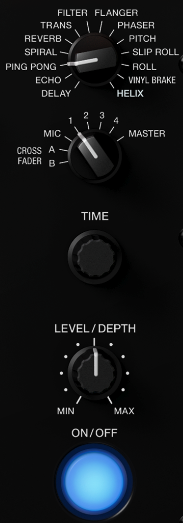
The Beat FX section is on the right-hand side of the mixer. If you're
not hearing any effect, check these three things:
1. Press the ON/OFF button so it lights up blue — the
effect won't apply until it's engaged.
2. Turn the LEVEL/DEPTH knob up from MIN toward MAX.
If it's sitting all the way to the left, the effect strength is at zero
and you won't hear any change.
3. Use the channel selector dial (marked MIC, 1–4,
CROSS FADER A/B, and MASTER) to choose which channel the effect applies
to. If it's set to a channel you're not using, you won't hear anything.