Speaker Troubleshooting — Recording Pro studios
Common problems and fixes
🔇 No sound out of the speakers
Are the speakers turned on and showing the power light?
Is the interface showing 3 green lights? If not, the USB cable isn't fully plugged in at the back of the interface. Don't use a USB hub — plug the other end directly into your laptop.
Are the two yellow speaker cables connected to LINE OUTPUTS 1-2 at the back of the interface?
Still no luck? Reset the Focusrite Control software.
🔈 One speaker isn't working
Are both speakers switched on with power lights showing?
Are the two yellow speaker cables connected to LINE OUTPUTS 1-2 at the back of the interface?
Try swapping the two yellow cables around — this can help show whether the problem is with the speaker itself or the interface output.
Still no luck? You'll need to reset the interface using the Focusrite Control driver.
🎚️ The volume control isn't working
Look at the back of the audio interface — you'll see 2 yellow speaker cables. Make sure they're connected to LINE OUTPUTS 1-2 only. If they're connected to LINE OUTPUTS 3-4, the volume knob becomes inactive.
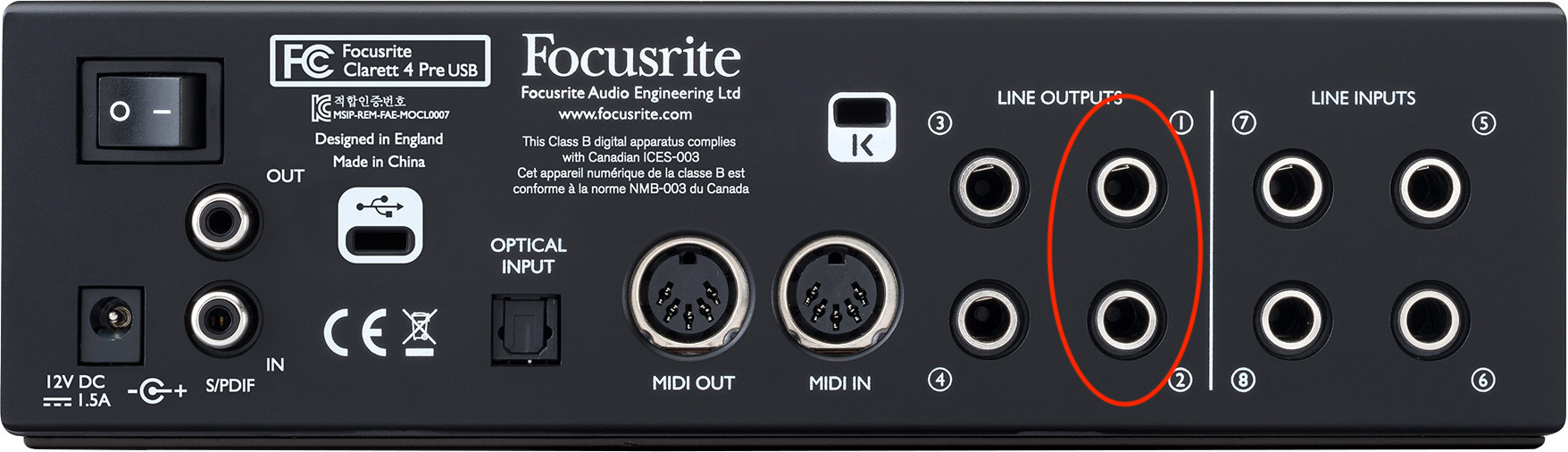
Getting no sound when connected to LINE OUTPUTS 1-2? Reset the interface using the Focusrite Control driver.
⏹️ Sound was working, then stopped suddenly
Disconnect your laptop, turn the interface off at the back, and leave it off for a couple of seconds.
Turn it back on and reconnect your laptop.
This should fix the issue, though you may need to repeat it more than once.
📢 The speakers sound distorted or blown
🔄 Still having issues? Reset the interface
99% of problems with equipment in the recording studios can be resolved by downloading Focusrite Control and resetting the interface to factory defaults.
Download link:
Download and install Focusrite Control, then restart your computer.
Once installed, open the software and go to File > Restore Factory Defaults (it also sometimes helps to go to Presets and select System Playback).
If Focusrite keeps causing the computer to crash, check whether McAfee Antivirus is installed — this is often the cause. Uninstalling McAfee usually resolves it.
Video: troubleshooting no signal from the speakers
Still stuck? Don't worry — our team's on live chat and WhatsApp 24/7, and we're always happy to help.